Last week, I demonstrated how to speed up your site using Joomla's cache feature. Here's a second speed tip:
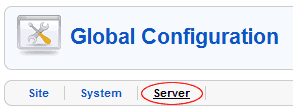
- Login to Administrator as demonstrated in lesson 6 of our free Joomla tutorial and go to Global Configuration
- Click on the Server link
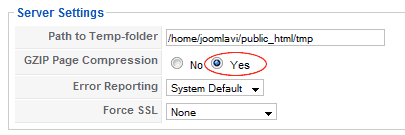
- Next to GZIP Page Compression, select Yes
- Click Save in the top right
All pages will now be compressed on the server before being sent to your visitor. This means your pages will load faster and you will use less bandwidth. There is a trade-off though. The process of compressing the pages consumes CPU power on the server which may adversely affect some sites. However most sites will benefit, so give it a go.

