Joomla Blog

Tutorials, reviews, case studies and other tips to help website owners and website developers master the Joomla content management system.

How to use Captcha in Joomla 2.5

Posted by on in Tutorial
  • Font size: Larger Smaller
  • Hits: 8616
  • 14 Comments
  • Subscribe to this entry
  • Print

You must have the Adobe Flash Player installed to view this player.

One of the new features introduced in Joomla 2.5 is Captcha. This functionality has been possible using third party extensions, but it is more convenient to have it built into the core. Here's how to use it.
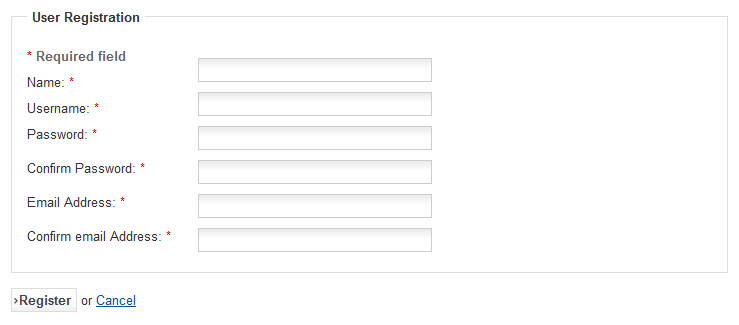
Registration form before adding reCaptcha

First, have a look at the standard Joomla contact form. If you use this feature, you know how prone it is to spam submissions. The same for the Joomla site registration form. So let's add a ReCaptcha function which is a service that is now owned by Google. Head over to http://www.google.com/recaptcha and click the Use reCaptcha on your site button. Then the Sign up now button. As this is a Google service, you need a Google account. If you don't have one, click Sign up and work your way through that process. Otherwise just go ahead and sign in.

On this page, enter your domain name. It's safest to do this without the 'www' part. Let's say your domain is my-very-very-very-long-domain-name.com. Enter that and click the Create key button. This produces two keys which we'll need in a moment. Leave this page open and head across to your Joomla Administrator.

Go to Global Configuration and ensure Default Captcha is set to Captcha – ReCaptcha. Click the Save & Close button and go to Extensions – Plugin Manager and towards the top of the list you will see Captcha – ReCaptcha. Click that to edit and make sure Status is set to Enabled. Now note the Public and Private keys in the right column. Simply copy these from the ReCaptcha page and paste them into their respective boxes. The first is the Public key and then there's the private key. Save this and head back to the front-end of the site to view the result.
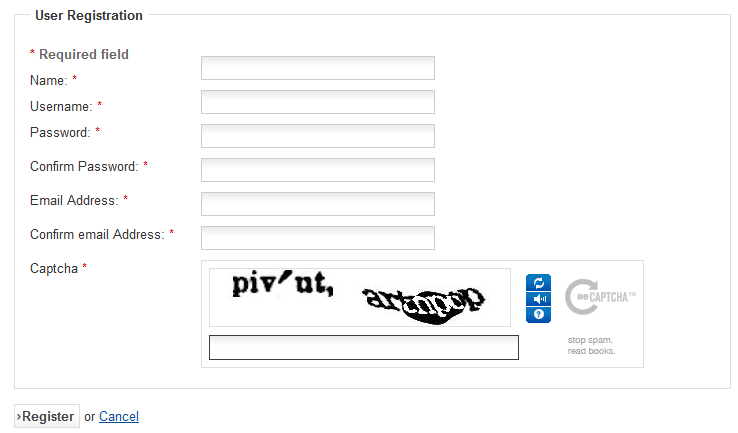
Registration form after adding reCaptcha

And there you have it, you now have one of those annoying Captcha functions that everyone hates, but it does mean an end to receiving spam from your Joomla registration and contact forms. If the design doesn't match your site, you can try one of the other designs by experimenting with the Theme options in the plugin.

Rate this blog entry:

Comments

  • Andy Markley
    Andy Markley Thursday, 8 March 2012

    ... thanks Richard. Brilliant, as usual.

  • Christine Cuttle
    Christine Cuttle Thursday, 8 March 2012

    Quick question...My site is using Joomla 2.5.2 (missed the 2.5.0 and 2.5.1 updates they happened so quickly). I see in Global Configuration the Default Captcha you mentioned but it simply says "None Selected" with no other options. I also looked at the Extensions Managaer unde rPLugins and see no Captcha-Rec Captcha there. I searxhed the Google site but it has no plugins for Joomla 2.5+ that I can see, only for J1.0 and 1.5. Any suggestions?

    Thanks for your great tutorials, WELL worth the subscription fee!

  • Robert Wilson
    Robert Wilson Thursday, 8 March 2012

    Christine,

    I've seen this mentioned in the Joomla forum somewhere. You might try going to the Discover page of the Extensions Manager, click on Purge Cache, then Discover and see if it turns up. I think this applies mostly to upgrades from 1.7 or before.

    You can also go to the Database page and click Fix to see there are any database issues that need clearing up.

    Good luck.

  • Guest
    Anbu Jaya Thursday, 15 March 2012

    Your response to Christine's query helped me as well. I had the same issue. After purging the caches and using Discover agains worked.

    Thanks for the tip.

    Anbu

  • maxwell
    maxwell Sunday, 18 March 2012

    Hi R.

    Excellent video and working for me.
    Many Thanks :=)
    Kind Regards ,

    MAxwell

  • Guest
    Christine Cuttle Sunday, 25 March 2012

    Hi again;
    So thank you Robert for your help! I did do what you suggested and I was abel to set it up.

    I did encounter another problem, wehereby the captcha image itself does not display anywhere on the registration form. I am not sure what to do at this point. Would anyone happen to have a forum link for this type of error?

    I did make sure my datbases are up to date and have ensured anything that needed to be installed for 2.5+ is as it should be. Just at a loss right now.

    Thanks again!
    Christine

  • Guest
    Christine Cuttle Sunday, 25 March 2012

    AHH...never mind folks. I figured out the issue.
    For anyone else who might have come across this problem: You need to go to:
    USERS>OPTIONS (beside HELP top right hand menu corner) and under COMPONENTS change the Captcha default to Captcha-recaptcha.

    Sorry to keep bothering everyone!

    Christine

  • Guest
    Colin Brace Tuesday, 18 September 2012

    Very helpful, thanks. I just wish there was a way to disable captcha for registered users. The contact form shows recaptcha for both guests as well as logged in users. :( The latter I trust.

  • Robert Wilson
    Robert Wilson Tuesday, 18 September 2012

    Colin,

    There are extensions that have this capability. You might check through the JED. Some extensions also have the ability to set captcha on for a user's first 5 posts or something like that. It is as you mention...until you trust them.

    Would be great to have this function in the Joomla Core though!

    Good luck.

  • Francois ACHARD
    Francois ACHARD Wednesday, 13 February 2013

    Hi all,

    The tutorial is great and informative as usual. Great work Richard. ;)
    I was quite frustrated due to a recurring issue with this simple captcha|re-captcha setup though. So, for those people like me, who also use the K2 features, please note you must disable one of the captcha way in either the Joomla! core or the K2 plugin; if you don't do so, you may as well get a conflict ending up with this message : "The words you typed did not match the ones displayed. Please try again."

    I found this tip over here and it works like a charm :

    http://www.knighton-web.com/index.php/tips-and-tricks/item/9-joomla-and-k2-captcha-conflict.html

    Hope it could help some people from the Community. :D

    Have a great day,

    François

  • Guest
    rahul Monday, 25 March 2013

    What if you want recaptcha enabled on both K2 and contact form? I have a Joomla 2.5 site which is using K2. I could successfully enable recaptcha for articles and comment forms on K2 pages. But how can I enable recaptcha on contact form, too?

  • Robert Wilson
    Robert Wilson Tuesday, 26 March 2013

    Hi Rahul,

    As Francois mentioned above, when you're using K2 and Joomla core articles and forms, you need to decide which one to use reCaptcha with, not both. We've found that to be the case as well. They don't seem to be compatible at this time.

  • Guest
    Rahul Tuesday, 26 March 2013

    Sad! That means if I am using K2, I can't enable recaptcha on both K2 and the contact form of the website at the same time. :(

  • Blake Burroughs
    Blake Burroughs Thursday, 16 May 2013

    Richard-- Thanks again for a wonderful tutorial!!

Leave your comment

Guest Monday, 20 May 2013