Joomla Blog

Tutorials, reviews, case studies and other tips to help website owners and website developers master the Joomla content management system.

Directing Visitors to your Most Important Content

Posted by on in Tutorial
  • Font size: Larger Smaller
  • Hits: 3453
  • 10 Comments
  • Subscribe to this entry
  • Print

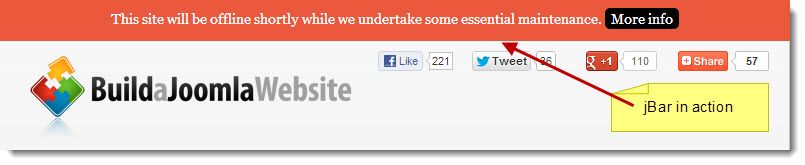
In this post I show you how to add a notification bar to the top of your pages using a free extension. This is a fantastic attention grabber that can be used to direct people to all sorts of things such announcing a sale or to encourage visitors to register for your newsletter. A few weeks ago I needed to shut down this site while I made some changes to the template. I hate doing this as the tutorials are accessed constantly from around the globe so there is never an ideal time to make major changes. There is no way to avoid it, but I did the next best thing. I installed jBar from ThemeXpert. This is a plugin based on the popular HelloBar that displays a colored bar at the top of every page. You can enter various text in here and include a button linking to any URL. Here’s how to get started:

  1. Download the plugin from ThemeXpert. At time of writing, it is compatible with Joomla 2.5 & 3.0
  2. Install in the usual way via Extensions Manager. Watch The Basics lesson 19 if you ned to revise this step.
  3. Go to Extensions - Plugin Manager and search for jbar. Click the title to open the extension.
  4. Set Status to Enabled.
  5. The main settings to configure under Basic Options, are the text that will be displayed (Message), the text that appears on the button (Link Text) and the URL that the visitor is sent to when they click the button (Link URL). So enter those values and click the Save icon in the top right.
  6. Go to the frontend and check out your notification bar. Then return to Administrator to experiment with other settings such as the colors and whether you want the bar to appear or hide after a certain time.
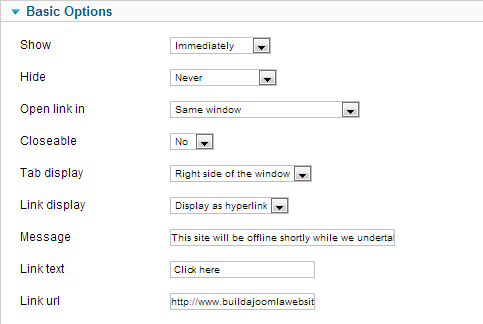
jBar Options

As many templates now include some sort of jQuery functionality, there is a good chance you can turn that option off. 

I’d like the developer to take this further and create a professional version that includes features such as the option to position the bar at the bottom of the page, include social sharing buttons or a newsletter signup from right within the bar.

How would you use jBar? Leave your comments below. 

Rate this blog entry:

Comments

  • Guest
    Parvez Akther Thursday, 3 January 2013

    Hello Richard,
    Thanks for your nice review! I need to mention 2 things
    1. Its ThemeXpert not ThemeExpert or ThemExpert :)
    2. A Major update is coming this mont and we are planning to release an Premium version with ton of improvement!

    Thanks

  • Richard Pearce
    Richard Pearce Thursday, 3 January 2013

    Fixed. Sorry about that. I'm normally very good at picking up unusual spellings because of my own weird company name (RickSure).

    You might like to reply here when the next version is out. Oh and I'd still like to see an option for the black 'call to action' button to be hidden.

  • Guest
    Andrew Rogers Thursday, 3 January 2013

    Good stuff there! Yeah, I also do wish the Pro version comes so that there is an option to set that bar to appear in specific and not in all pages. ;)

  • Guest
    Parvez Akther Tuesday, 22 January 2013

    Yes, Andrew this feature will add in version 1.3 promise :)

  • Mike Martin
    Mike Martin Thursday, 3 January 2013

    Richard
    Thanks for the information, what a great addition, cannot thank you enough.

  • Guest
    Alex Knight Saturday, 19 January 2013

    Is this plugin similar to breadcrumb navigation or something :D

  • Richard Pearce
    Richard Pearce Sunday, 20 January 2013

    It IS a plugin. But unlike a module where you specify a template position, it always appears at the top of the page.

  • Guest
    Parvez Akther Tuesday, 22 January 2013

    As promised jBar 1.2 released with some new features and performance boost.

    -Changelog
    + Option to turn off link
    + Sticky position
    + New installer
    # Optimized and organized code base for performance.

    More details http://www.themexpert.com/joomla/extensions/jbar

  • Carl Uttley
    Carl Uttley Friday, 22 February 2013

    A clever way of using an excellent plugin... I'd certainly be interested in a pro version too.

  • Blake Burroughs
    Blake Burroughs Thursday, 16 May 2013

    Richard--

    I was wondering how they do that....thanks for the tip!

Leave your comment

Guest Tuesday, 21 May 2013